 Enes Guven
In the early days of computer networks, establishing communication required using devices of the exact same brand and model. A closed ecosystem meant an IBM system could not easily talk to a DEC system. To solve this incompatibility and ensure that devices from different manufacturers could communicate seamlessly across a global network, universal standards had to be developed.
The two most fundamental frameworks born from this necessity are the OSI (Open Systems Interconnection) Reference Model, developed by the ISO, and the TCP/IP Reference Model, developed by the US Department of Defense. In this log, we will deep-dive into how these multi-layered architectures dictate the flow of data.
1. The 7-Layer OSI Reference Model
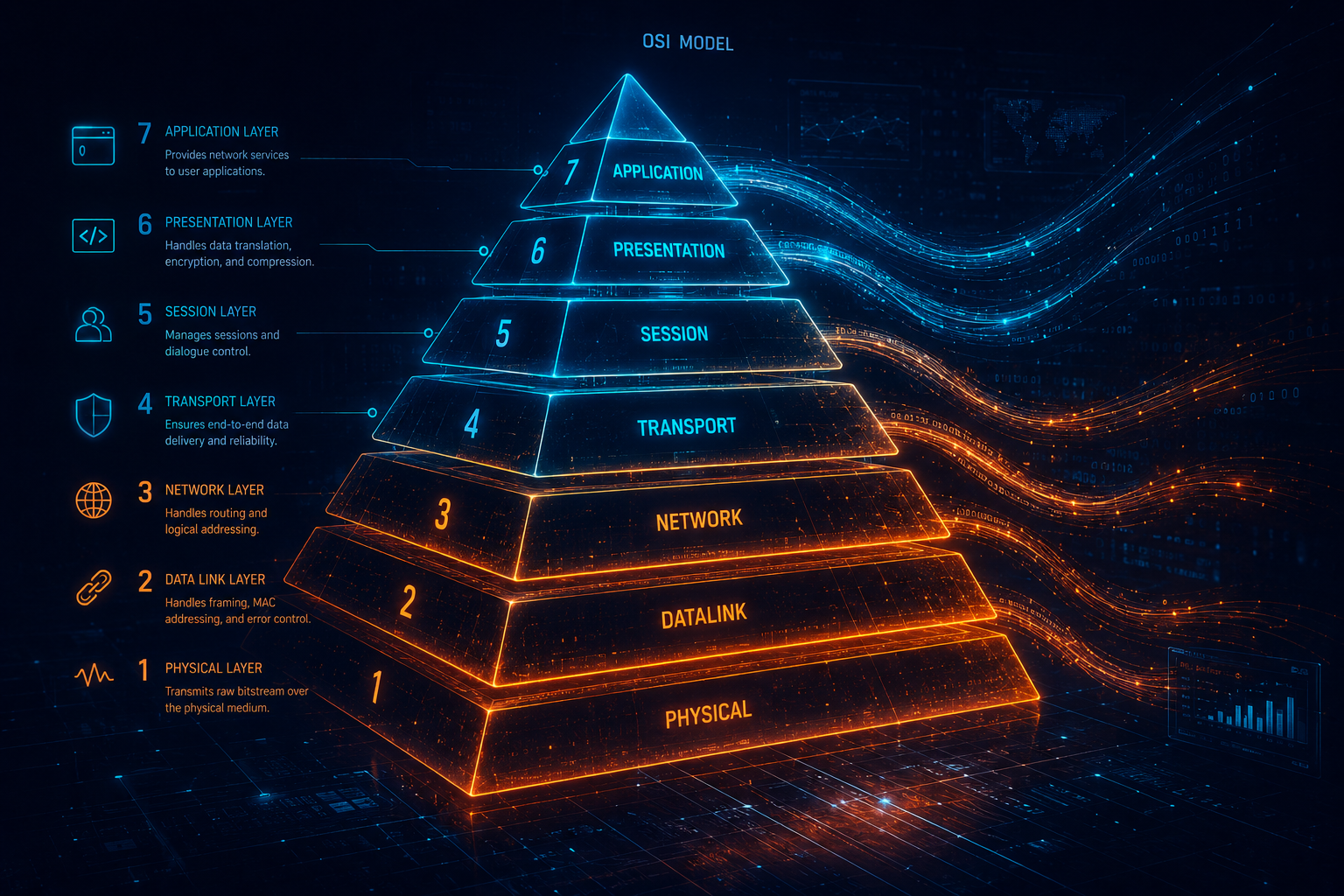
The OSI model defines the communication process of a node within a highly structured, 7-layer hierarchy. When data is transmitted, it passes down through all these layers on the sender's side, and travels back up through the layers on the receiver's side. Each layer has a specific job and relies on the layer below it to function.
Layer 7 - Application Layer
This is the layer where users and application programs interact with the network. It encompasses the functions required for network access. Protocols like HTTP (web browsing), SMTP (email), and FTP (file transfer) are defined here.
Layer 6 - Presentation Layer
Before data can be sent, it must be understandable. The presentation layer translates, formats, encrypts, and compresses data. It acts as the network's translator, preventing communication breakdowns between devices with different encoding methods.
Layer 5 - Session Layer
This layer establishes, manages, and terminates sessions (dialogues) between end nodes. Importantly, it maintains the logical continuity of the communication; if a session drops, it ensures transmission can resume from where it left off.
Layer 4 - Transport Layer
The transport layer ensures error-free, end-to-end delivery of data. It takes large chunks of data and breaks them down into smaller blocks called Segments. It monitors the sequential transmission and checks if the data successfully reached the destination. If an error or packet loss occurs, it retransmits the data.
Layer 3 - Network Layer
This is where routing happens. The network layer ensures data reaches the receiver by navigating through intermediate nodes (routers). It selects the best path based on network conditions and priorities. The data blocks containing logical IP addresses at this layer are called Packets. The entire internet backbone relies on this layer to facilitate communication between entirely different networks.
Layer 2 - Data Link Layer
The data link layer establishes rules for accessing the physical media. Data is converted into logical signals and packaged into Frames. It is responsible for bit-level error detection and node-to-node delivery within a Local Area Network (LAN). Protocols specific to LAN technologies like Ethernet and ATM operate here.
Layer 1 - Physical Layer
The lowest layer converts data into raw bits (0s and 1s) and transmits them electrically, optically, or via radio waves. It defines physical parameters like cables, connectors, and transmission speeds.
2. The TCP/IP Protocol Suite
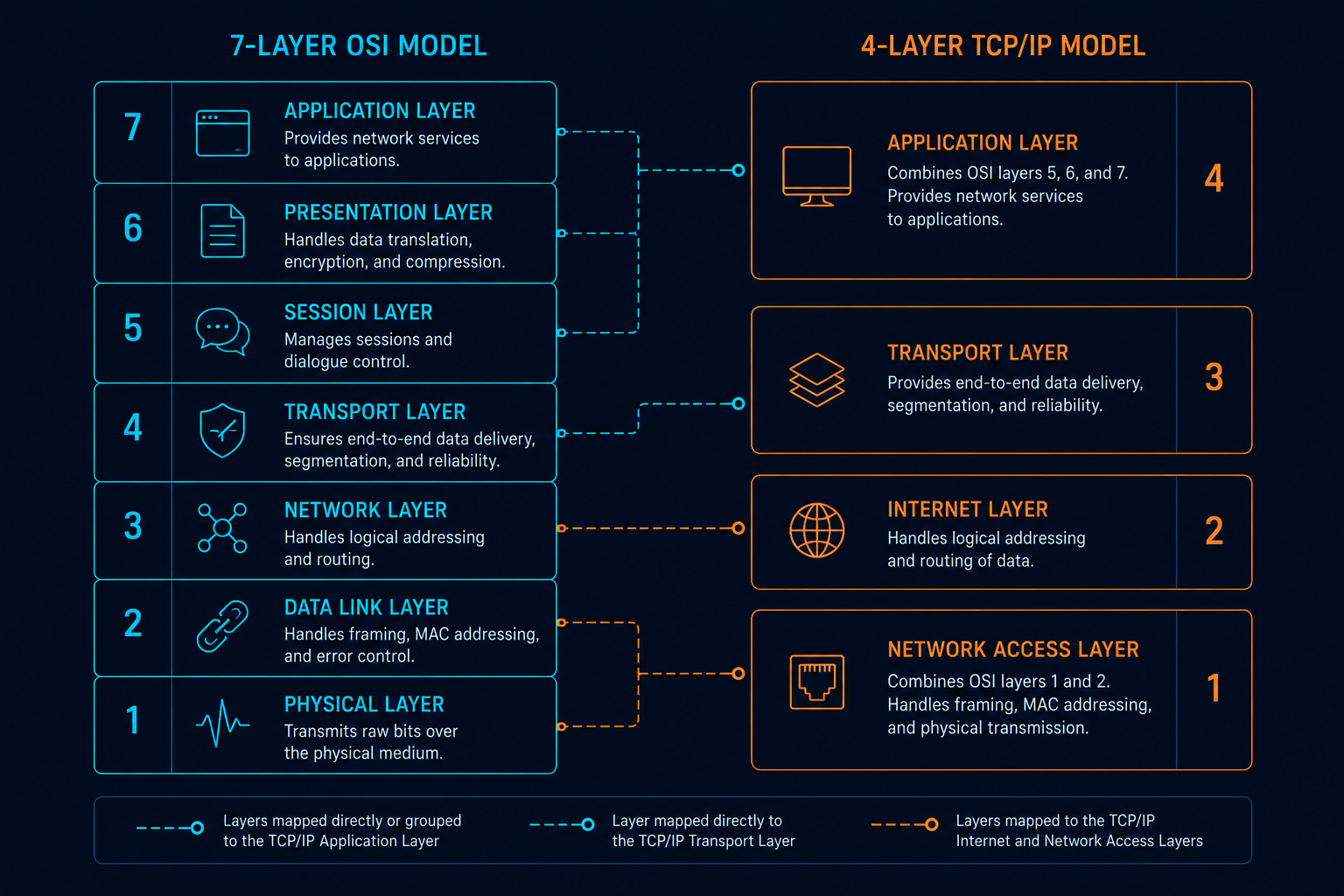
While OSI is the perfect theoretical model, the real-world internet runs on the TCP/IP model. It is a family of over 15 protocols condensed into 4 practical layers. The two foundational protocols give it its name: TCP (Transmission Control Protocol) and IP (Internet Protocol).
Application Layer (TCP/IP)
This condenses OSI's layers 5, 6, and 7. It determines the type of data to be sent and processes it through protocols like HTTP, SMTP, and DNS.
Transport Layer (TCP/IP)
Determines how data is sent, focusing on security and error control. The two main actors are:
- TCP: Used for classic, reliable data transfer. It is highly secure but slower, as it constantly checks if every single packet successfully reached the destination before sending more.
- UDP (User Datagram Protocol): Used for media and real-time streaming. It is faster because it does not wait for delivery confirmations—prioritizing speed over perfect accuracy.
Internet (Network) Layer
This is where the destination IP address is added, and data is routed. Historically powered by IPv4 (32-bit addresses), this layer is actively transitioning to IPv6 (128-bit addresses) to accommodate the massive explosion of internet-connected devices, ensuring we never run out of IP addresses.
Network Access (Physical) Layer
Combines OSI layers 1 and 2. It determines the characteristics of the communication medium, speed, and coding schemes (e.g., Ethernet, Wi-Fi).
The Journey of a Packet: Encapsulation & Decapsulation
Let's trace a web request from a server to your computer:
- On the server, applications generate an HTML output and hand it to the HTTP protocol (Application Layer).
- The data moves to the Transport Layer, where port numbers and data segment sizes are added.
- The Segment moves to the Network Layer, where your computer's IP address and the server's IP address are attached, turning it into a Packet.
- Finally, the Packet hits the Physical Layer, where physical MAC addresses are added to form a Frame, which is then converted to bits.
This raw data travels thousands of kilometers across routers and fiber cables. When it reaches your computer, the exact reverse process (decapsulation) occurs. Your network card strips the physical layer, your OS strips the IP and Port headers, and your web browser renders the HTML payload. A modern engineering marvel happening in milliseconds.